An invisible channel
See whether your brand appears when customers ask AI about your category.
For in-house marketing teams
Diploria tracks how 12 paid-capable AI surfaces, from ChatGPT to Google AI Overviews, describe and recommend your brand. See who appears instead and turn the evidence into a clear action plan.
Free plan, no card required.
12 paid-capable AI surfaces · Memory and Live coverage · Free plan available · Built in Sydney
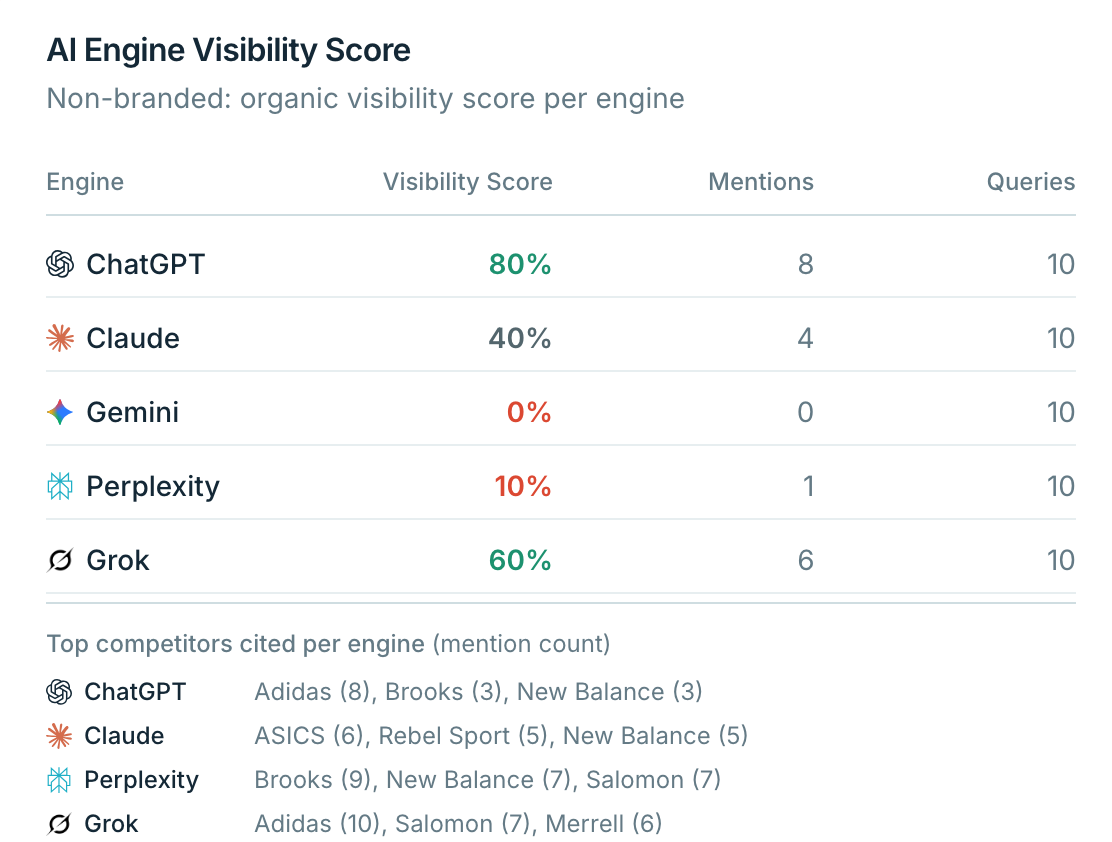
AI recommendations do not appear in Search Console or a traditional rank tracker. Manual spot checks change between runs and do not reveal a reliable trend, the competitor pattern, or the next action. Diploria creates a monitored baseline your team can review and report.
See whether your brand appears when customers ask AI about your category.
Replace scattered screenshots with repeatable measurements and stored responses.
Separate content, technical access, and third-party source opportunities.
Measure mentions, position, sentiment, and share of voice across 12 paid-capable AI surfaces. Memory mode shows what supported models already know; Live mode shows what supported engines find on the web.
Explore tracking featuresFind questions where competitors appear and your brand does not. Trace the citations behind AI answers to see which sources influence recommendations in your category.
Explore competitive intelligenceUse readiness scans, AI access checks, Focus Map, and a prioritized action list to decide what your team should improve on your site and across third-party sources.
Explore AI optimizationTurn monitoring into an executive-ready Brand Intelligence report, export a PDF, or connect eligible plans to reporting workflows through Looker Studio, API, and MCP access.
Explore reporting featuresCompetitive intelligence
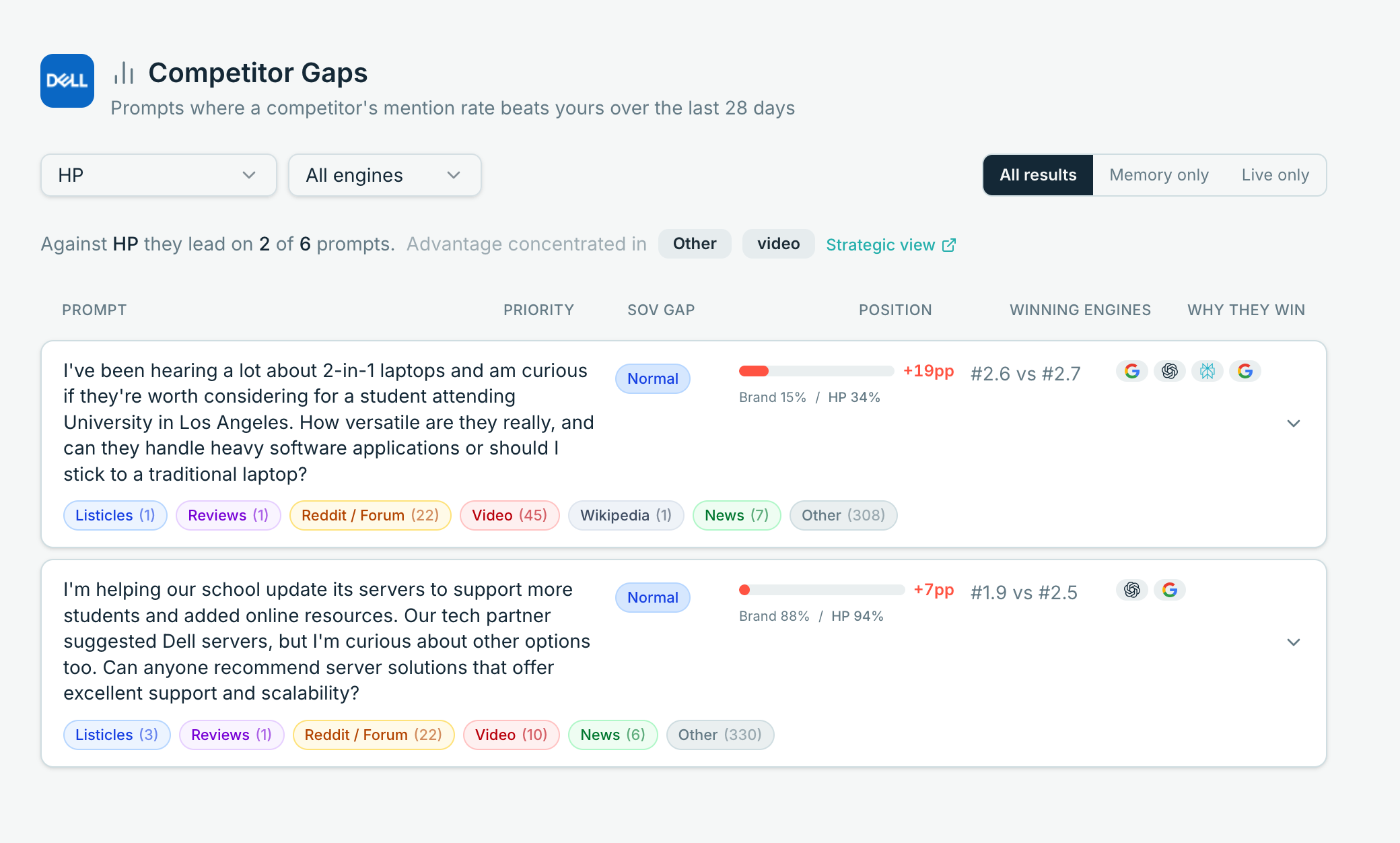
Prompt Gaps collects tracked questions where a selected competitor earns a stronger mention rate. Compare Memory and Live results, inspect the engines involved, and use the source patterns to shape the next content brief.
Reporting
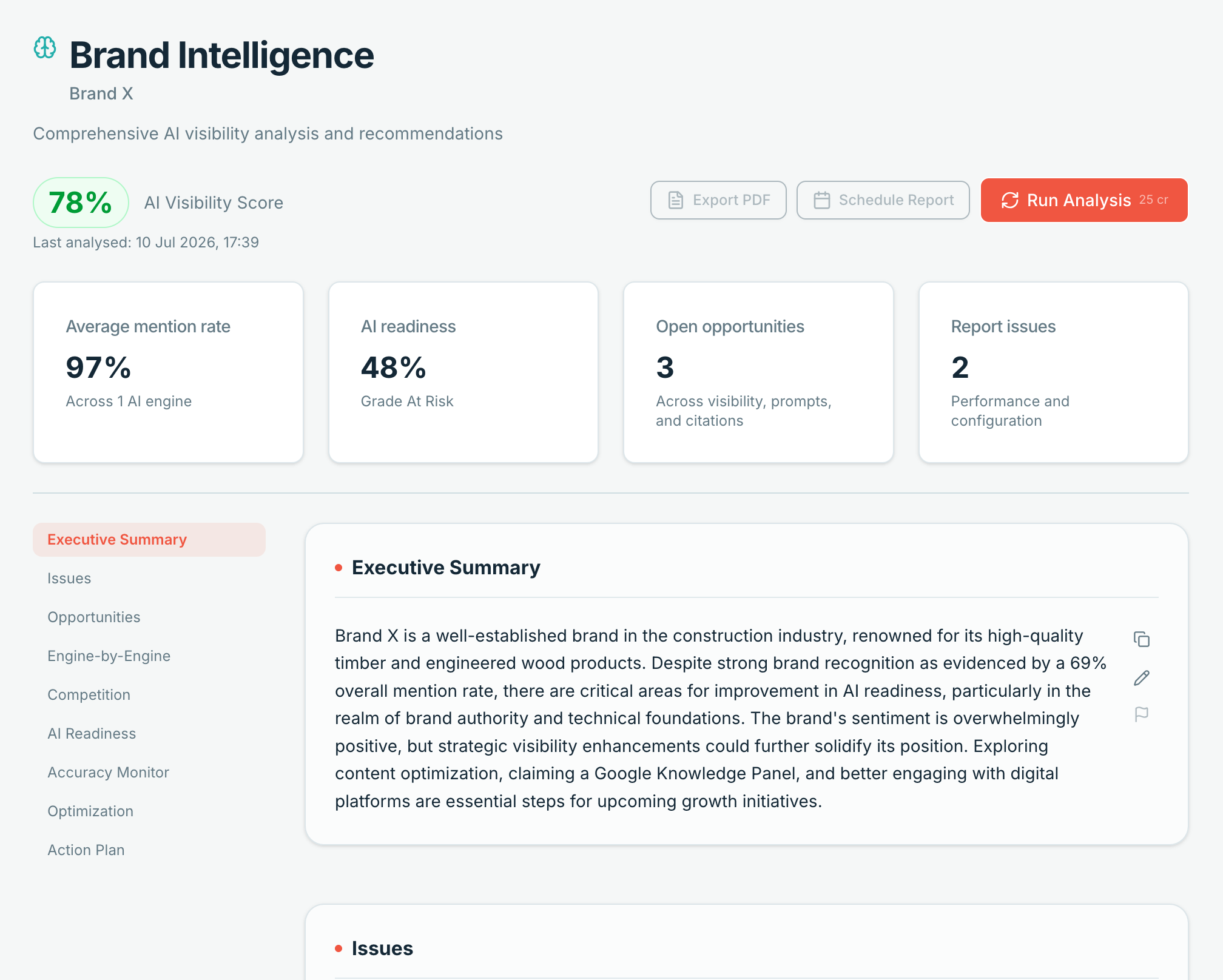
Bring visibility, competition, readiness, accuracy, and prioritized actions into one report. Edit the executive summary, export the report as a PDF, and use it as the starting point for your next leadership update.
Give each stakeholder the right access and organize monitoring around the way your team operates.
Invite teammates with Admin, Editor, or Viewer access. Pro includes up to 3 team members.
Share a brand with an agency as View only or Guest Admin while the brand stays owned and billed by your organization.
Track locations that matter to your brand. Current limits are 1 on Free and Starter, up to 10 on Pro, and broader capacity on Advanced.
Group prompts with intent and custom tags, then filter reporting around products, campaigns, funnel stages, or markets.
Use the notification options available in the product for poll and account activity. Custom per-brand alert rules are not currently included.
Pro, Advanced and Enterprise include GA4, Looker Studio, API, MCP and Agent Traffic access. Free and Starter do not include these connections. 90-day raw event retention; up to 500 events in the filtered feed; AI insights cost 2 credits. No separate monthly event quota is currently enforced.
A practical path from baseline to ongoing tracking. Results depend on your category, the changes you publish, and each engine's refresh cycle.
Week 1
Add your brand, competitors, prompts, and market. Run an initial poll across the engines available on your plan and review the branded and non-branded results.
Week 2
Review Prompt Gaps and readiness recommendations. Prioritize clearer answers, useful supporting pages, structured data, and AI crawler access where relevant.
Week 3
Ship selected changes and run another poll. Live surfaces may reflect newly crawled content before Memory results change.
Week 4
Choose a polling cadence supported by your plan, create a Brand Intelligence report, and share the findings with your stakeholders.
Use a consistent AI visibility score, competitor context, and executive report for leadership conversations.
See relevant featuresConnect citations, readiness, crawler access, and Agent Traffic with the rest of your search program.
See relevant featuresTurn Prompt Gaps and discovered questions into prioritized briefs grounded in monitored demand.
See relevant featuresTrack sentiment, accuracy issues, and the third-party sources AI engines use when describing your brand.
See relevant featuresFree includes 50 monthly credits and ChatGPT, Claude, Gemini in Memory mode. Paid plans unlock the 12-surface set; availability and supported Memory or Live modes vary by engine.
One marketer tracking one brand
In-house teams working on one brand
Organisations managing several brands
If your organization needs an Enterprise arrangement beyond the published plans, talk to our team about your portfolio, access, and implementation requirements.
Talk to our teamNo. An in-house marketer can set up a brand, review results, and work through the recommendations. If you already use an SEO, content, or PR agency, you can share brand access so they can work from the same monitoring data.
SEO tools measure rankings, impressions, and clicks in traditional search. Diploria measures what AI engines say: whether your brand appears, how it is described, which competitors appear instead, and which sources are cited. It adds an AI visibility layer alongside your existing search reporting.
Memory mode asks a supported model to answer from its existing knowledge without web search. Live mode uses web-connected results. Live answers can include citations when the engine provides them. Some surfaces are Live-only, and not every engine supports both modes.
Timing depends on the engine, the change, and when content is crawled or a model is updated. Live results may reflect newly crawled pages sooner. Memory results can change more slowly because they depend on the model provider's updates. Diploria measures movement without promising a fixed outcome date.
Start with a focused set covering your core products, category questions, comparisons and branded prompts. AI-suggested prompts are available on Free, Pro, Advanced and Enterprise, but not Starter. Add more after you understand the first gaps and the credit cost of your chosen engines and polling cadence.
Free is a useful starting point with ChatGPT, Claude, and Gemini in Memory mode. Starter suits one marketer who needs the broader paid engine set and weekly polling. Pro is the usual fit for a small in-house team because it adds daily polling, three team members, more locations, API, MCP, and other Pro features.
Your account and brand setup are not exposed to other customers. Diploria sends requests to selected AI providers to run polls and uses service providers to operate the platform. Review the Privacy Policy for the current details on data handling, subprocessors, retention, and your choices.
Create a free account for ongoing Memory-mode tracking, or run the free AI visibility check for a quick starting point. No card required.